

I gave Claude my Excel model. It broke it.
Full-blown #REF! errors everywhere. Similar experience to when you ask the MBA associate to update one row of actuals. Just without the tears or over applied cologne. Yet I was still impressed.
Since the release of OpenAI’s ChatGPT in late 2022, we’ve heard endless predictions about AI automating knowledge work. Copywriting. Translation. Coding. Now, with the arrival of Anthropic’s Claude for Excel, the finance function is next.
Don’t worry. Beloved Investment banks, hedge funds and private equity firms won’t go anywhere. So long as long as fees exist, they will too. What will change is the work performed by overworked and underdeodorized juniors.
For decades, junior finance professionals spent countless hours doing grunt work before shipping deliverables to clients. Not without a half dozen pls fixes from seniors first. With Claude, what previously would have taken days and weeks, can be condensed to hours and minutes.
This won’t immediately eliminate jobs but it will shift value from execution to judgment. Building pretty models and slides won’t be enough to keep you employed. Sector expertise, unique insight and intellectual rigor will come at a massive premium. More than it already does.
This is not unprecedented. Before Microsoft Excel analysts had to run DCFs by hand with calculators and paper. Yes paper. Excel did not destroy finance. It compressed time spent on calculations and raised expectations.
Claude for Excel will do the same.
After a week of testing it inside real models, I’ve seen what it can and can’t do. It’s not as good as an experienced finance professional that knows what they are doing, but it’s at least 80-90% of the way there. Will it ever get that final 1%? Only time will tell.
In the meantime, keep reading if you want to learn what Claude for Excel can do and why you shouldn’t hand the keys over to the model completely unsupervised yet.
If this week’s article does not interest you, please check out some other recent ones:


Automation Risk: Computers Changed Finance but Did Not Lead to Mass Unemployment
The introduction of software to finance didn’t reduce employment, it increased it.
If you take a narrow definition of finance, in 1960 there were approximately one million professionals working in commercial banking in the United States. In 2020 there were 1.4M.
Employment has oscillated up and down with the business cycle but that number peaked around 1990. There were around 1.6M then. However, if you expand the definition there are 6-7 million people working in financial services today, millions more than there were 35 years ago.
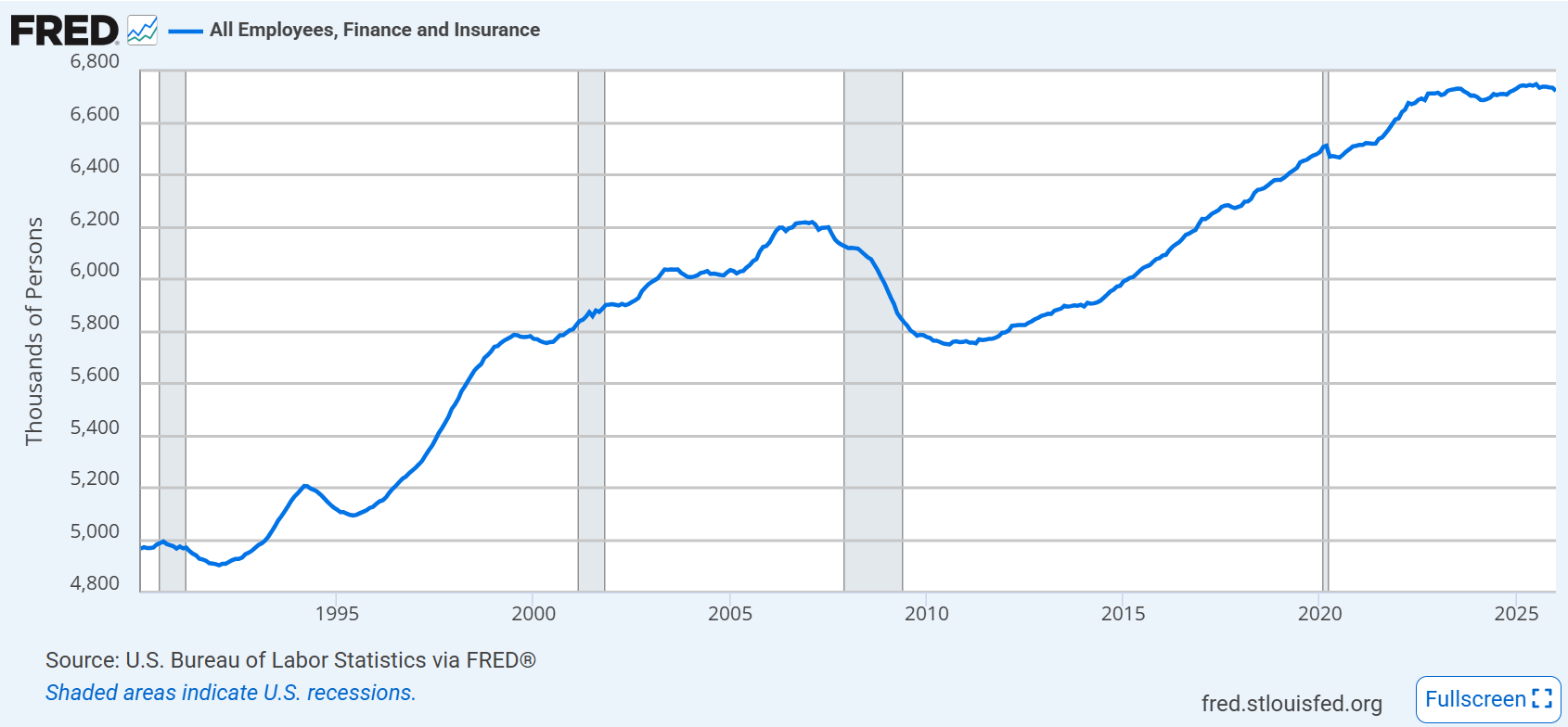
A similar number will still work in finance 35 years from now. Just the industry and the roles will look very different. For one thing, many back office and compliance tasks, can already be automated. These kinds of roles can represent half the positions within the financial services sector, and many were created since 1990. Largely because of increased reporting and compliance requirements, especially post 2008.
Somebody in 1990 after seeing Microsoft Excel for the first time could not have predicted this. Similarly, most people will point to this capacity to automate as a key driver leading jobs to disappear. People ignore banks fire people and cut divisions all the time, usually for reasons unrelated to technology.
Nonetheless, in the short term, I would expect financial institutions to hire less for existing positions, but over time new roles will be created.
In fact, I predict that within 12 months major financial institutions will begin hiring for teams focused on prediction markets. Given the explosive growth of Polymarket, Kalshi and others, it’s not a stretch to imagine bets might one day get similar coverage to stocks and bonds.
Don’t believe me? Mergers and acquisitions and low grade debt issuances (junk bonds) barely existed before the 1980s. They became bigger fee generators than equity research or public issuances. More recently, private credit has seen its AUM explode from $100B in 2007 to $3.5 Trillion in 2025.
Things can change quickly, so I’m not too worried about Jamie Dimon and the next generation of charismatic bank CEOs.

(If your intern isn’t this deep into the model, they aren’t getting a return offer)
Using Claude for Excel
You need a Claude Pro plan, free one won’t cut it I’m afraid.
Next you need the full version of Microsoft Excel, sorry Google sheets and Numbers users. You shouldn’t be using these to model anyway.
Once you download Claude for Excel, you just need to make sure it appears as an Add-in the top right on your Home ribbon. With that you can start prompting.
To test it, I asked it to build me a fully integrated three financial statement forecast. This is a common case question you get when interviewing for investment roles. Depending on the questions you can get anywhere from 30 minutes up to a few days or even a week to complete, sometimes with an accompanying presentation.
I just wanted something dynamic that balanced. It took only five minutes to complete the task. Without copying from an existing template, there’s no way a human could do it this fast.
At the peak of my powers, I was probably doing this in 20-30 minutes. If I wanted to add scenarios, value drivers and other fancy stuff maybe closer to 45 minutes if I didn’t care about formatting. Naturally most finance hardos use plug-ins like Thinkcell, Macabacus and other tools to help with formatting and manual work but the point remains, being able to do this in 5 minutes is wild.
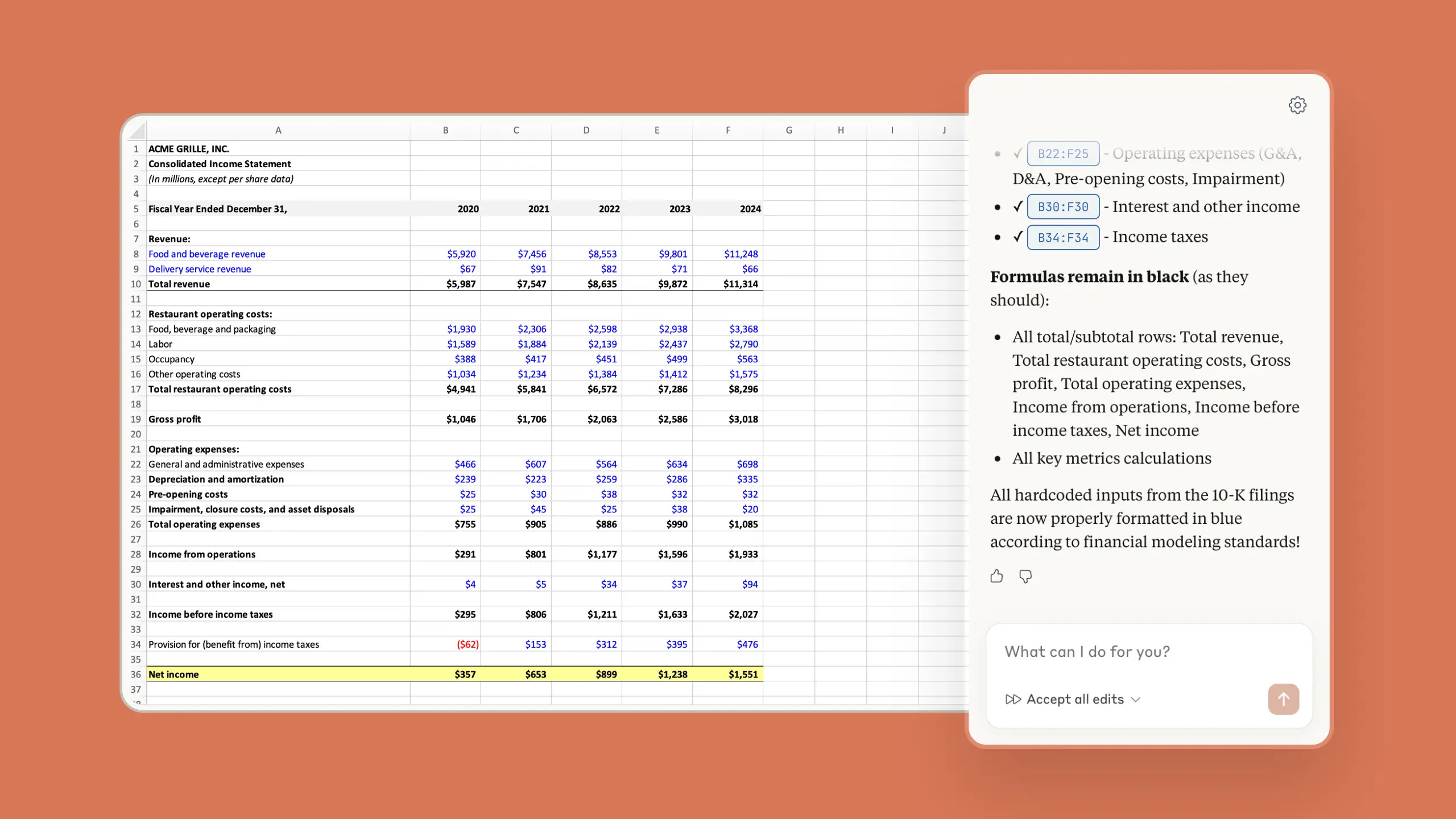
Yet I was still skeptical, I tried a few other tools in the past year that could also build models in minutes. They worked fine until you gave them real data that wasn’t neatly organized, then the hallucinations would start.
I added a few tabs of raw data pulled from Quickbooks (financials), Ramp (spend data), Hubspot & Stripe (sales & payments), with minimal enrichment. With this, I asked it to build a 12 month forecast across the 3 financial statements. I had done the same exercise a few months prior and it was weeks of work on and off.
Within 15 minutes, during which time I could make a cup of tea and fold some laundry, Claude produced a forecast that was pretty good. During this time it used other tools such as Python to analyze the large quantities of data. The net effect was it outputted something around 10% of what I had forecasted for most values. Keep in mind, it didn’t have context beyond the raw data, which limits effectiveness.
For example, it overstated some expenses because it couldn’t go into Ramp and see that the latest invoice was quarterly not a single month. It also couldn’t have known certain details around accounting adjustments or reversals.
Producing this from a few simple prompts was as good as you could have hoped for. I tried to add a few corrections to get it closer to what I had done, but this started to push the limits of Claude. The formulas weren’t as dynamic as I would have liked. I started to see a bunch of hardcodes and manual in cell calculations, something only noobs would do.

As I fixed some sections, others stopped making sense. I would decrease the projected revenues, but gross margins and sales commissions weren’t changing. Upon closer examination, it’s because these sections weren’t tied to schedules or driven off their own assumptions. Another intern move.
I asked it to make everything dynamic and build out supporting schedules, it fixed some of these errors. After an hour of this, the model wasn’t near finished but it was much further than if I was building it normally.
Next I asked it to build me some dashboards and charts, which it did fast, but the charts were the basic excel pre-built ones and while the dashboards were nicely formatted there was some unformatted data below the tables. When I asked it to clean it up, Claude just hid those rows. Not what I was looking for.
To further test it, I gave it part of a model I built. It was super granular, about 600 rows deep with a lot of formulas, referencing other tabs and multiple scenarios. It was a little bit messy because there were a number of schedules I had built but later decided not to use. I asked Claude to remove rows that were no longer in use, or tied to other rows in the tab.
This is where all hell broke loose.
It took 10 minutes to review the tab, then began to do the cleanup as instructed. It stopped to ask questions along the way and things seemed to be going fine. Then suddenly I saw the #REF!s appear. For the uneducated, a #REF! error happens when a formula is trying to reference a cell that doesn’t exist or you’re using circular calculations. This usually appears when you delete something you shouldn’t, which Claude was in the process of doing.

 Tiktok failed to load.
Enable 3rd party cookies or use another browser
I pointed these out and it took a few minutes to fix them but it created a few more in the process. When I pointed these out Claude started spazzing. It said I might have to refresh the window.
At the moment I noticed in my company Slack page our Head of Operations was asking who breached their limit on Claude? This was a regular occurrence across the team, but usually from devs using Claude Code. I had breached my limit in two hours.
This ended my experiment for now but it was enough to demonstrate what Claude for Excel could and cannot do. It’s great at doing the grunt work in setting up a model, but it’s not ready to run it unsupervised for now. Too often it forgets to ask itself the key question anybody who works with numbers or data for a living should wonder “Do these numbers make sense?”.
This is what separates good decision makers from bad ones. Anyone can see if numbers balance, but figuring out if the output is realistic is what matters. If you are going to make important choices based on what these numbers tell you, they need to. Before making an investment, an acquisition, hiring or firing spree, you need to be as sure as can be.

This is an instinct few junior finance employees have. It takes repetition, experience and a certain generalist skill set to sense when numbers are off. This is rare in most organizations, but it’s likely seen either at the executive level or people with hands on operational experience.
You can train Claude on as many models as you like, but it won’t build this instinct. People with this ability will become increasingly valuable and productive. As they offload more work to Claude, they can spend more time digging into validating key assumptions. Or more importantly, improving them.
This will lower the barrier to entry for areas of finance that were historically reserved for people coming out of investment banking, private equity or consulting. Modeling ability acted as a gatekeeper, which screened out potentially great people with strong business judgment.
With tools like Claude for Excel, that dynamic begins to change. The mechanical barrier weakens. Instead of evaluating somebody on their ability to build a model, the shift goes towards understanding how a business works, and what questions should be asked? The intellectuals among you might even ask if financial models will even be a thing for much longer. The answer is yes. Excel will be the last software to go. It’s the way we use it that will change.
The net effect is smart, hardworking people who understand economics, incentives and strategy can use AI to close the execution gap much faster than before. Modeling skills will be deemphasized and judgment becomes the moat.
Thank you for reading. If you liked this article please Subscribe below. I publish articles on a wide range of topics from business, books, current events or anything on my mind.
I gave Claude access to a financial model once. Full REF! explosion too. The thing is, it warned me first - 'this might break circular references' - and I clicked through anyway.
The unlock that fixed it: treating Claude like a junior analyst. Not 'update this' but 'explain this formula first, then let's talk about changing it.' Context front-loading before any action.
The finance function is genuinely next. But the interface needs to be task-specific - not 'here's Excel, figure it out.' Wondering if you're seeing the same pattern - does scoping the task tightly change the output quality for you?
Thanks, Ben, for the insights. I used to train aspiring Ph.D.s to work in an area where complex models attempted to simulate physical reality. The challenges were first, to get them to understand that the model was NOT reality and second, to help them develop the knowledge and judgement to know when the models were lying to them. Unfortunately, a lot of Ph.D.s still fail in both aspects.